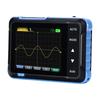
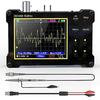
• [Convenient & Compact] The DSO-TC3 oscilloscope is a product equipped with digital oscilloscope function, transistor tester function, and signal generator function. Built-in rechargeable lithium battery, can standby for 240 minutes. The compact design makes it convenient to carry. The display is backlit so it can be clearly read even in strong light environments.
• [Oscilloscope function] Real-time sampling rate is 10 MS/s, bandwidth is 500 kHz, and voltage signals up to 400V are supported. Equipped with complete trigger functions (auto, normal, single), you can freely trigger periodic analog signals and aperiodic digital signals. Furthermore, it has an autoset function, which saves you the trouble of making adjustments, and you can display the measured waveform just by pressing the AUTO button.
• [Transistor Tester] Automatically identifies and measures various transistors such as NPN and PNP transistors, N-channel and P-channel field effect transistors, junction field effect transistors, and passive components such as resistance (Ω), inductor, and capacitor. In addition, automatic detection of transistor terminals (base, collector, emitter) is also possible.
• [Signal generator] Six types of signal waveforms can be displayed: sine wave, square wave, pulse wave, triangle wave, ramp wave, and DC wave. The output frequency adjustment range is 1~100 KHz, the output voltage is adjustable 3.3 V, and the output duty ratio is adjustable 0~100%. Note: Oscilloscope, transistor tester, signal generator, three functions cannot be used at the same time
• [Other functions] Toolbox function: Automatically identifies and analyzes NEC protocol infrared codes. Other features include continuity checking, 0-40V input voltage measurement, PWM output, 0-32V diode measurement, DS18B20 temperature sensor measurement, DHT11 temperature and humidity sensor measurement.
• [Japanese manual] PDF Japanese manual is available. You can download the instruction manual by scrolling down the product details page (this page) and clicking on the blue text "User Guide (PDF)" in the "Safety and Product Resources" section.


 No-delivery refund






![OWON HDS242S Oscilloscope Multimeter Arbitrary Waveform Generator Compact 2 Channel 40MHz Bandwidth Direct 3 Year Instruction Manual 250Ms/s []](https://img.joomcdn.net/65e6577ed84ffbffcc36727a718036bbb0bc587a_100_100.jpeg)